Electrostatic Capacitive Keyboards: HHKB and Realforce — Personal Experience
Early this year I watched a video about someone’s work-from-home setup, and they mentioned using a keyboard they had rented — a keyboard called HHKB. At the time my reaction was: rent a keyboard? Out of curiosity I looked it up, and found that the dual-mode silent version costs around ¥37,500 JPY. That was the first time I’d discovered a mass-produced keyboard this expensive. On Chinese retail sites, the same version was listed at ¥2,799 RMB.
Who buys a keyboard that expensive? That question nagged at me, so I dug into the details — how it works, what makes it different from mechanical keyboards, and so on.
Through my research, HHKB seemed to have become synonymous with programmers. Everyone called it a “programmer’s tool.”
There were dissenting voices too, pointing out that the key layout is difficult to adapt to. The Ctrl key positioned where Caps Lock normally sits is only truly friendly for programmers who use Linux and Vim. In practice, many programmers write code in GUI-based IDEs, and from a pure daily-use perspective, HHKB’s design philosophy isn’t particularly convenient. There are no dedicated arrow keys either — accessing arrow key functions requires pressing Fn alongside other keys.
So people also recommended the Realforce brand — the same electrostatic capacitive principle and typing feel, but with the option of a full-size layout or an 80% (no numpad) layout. The Chinese name is 燃风 (“Burning Wind” — personally I think “Real Force” translates better). Realforce has another advantage: you can choose keyboards with 30g, 45g, or variable-weight actuation. The two brands seem to be affiliated under the same corporate group, so the feel should be similar.
Which one to buy? After enough research I felt I’d already fallen in. Academic research has a heavy writing component, and my current field involves scripting, which adds an amateur programmer dimension — so a keyboard that’s friendlier to heavy typing felt genuinely worth the investment. I also came across a domestic brand called Niz (阿米), which is cheaper and essentially appears to have reproduced the product line of HHKB and Realforce. Online reviews for Niz weren’t as strong as for these two Japanese brands, so I set it aside.
The Decision: Buy Both
I ultimately decided to buy one of each.
-
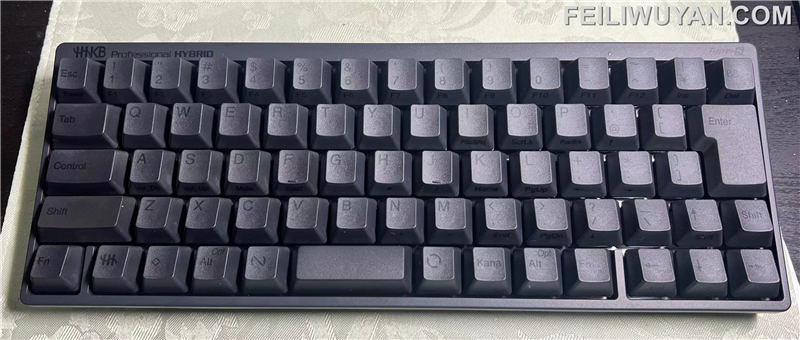
HHKB — compact size, used at home for work
-
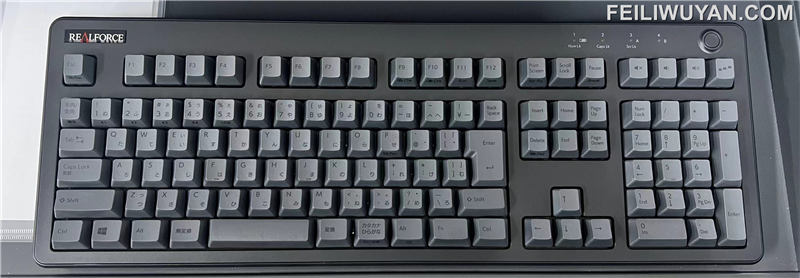
Realforce — full-size, 45g, used at the office; having a numpad is convenient when organizing data
Both are 45g, so the typing feel and the basic muscle-memory pressure are consistent between the two. I don’t need to specifically re-adapt when switching. The main difference is that HHKB, having no F-key row, puts the Esc key on the same row as the number keys, while Realforce’s Esc sits on the same row as the F keys. Additionally, on HHKB the Esc key occupies the position normally used for Japanese IME input-mode switching (kanji/romaji / half-width/full-width toggle) — that function is relocated to the left of the Win key and takes a small amount of adjustment.
Typing Feel
The typing feel is genuinely wonderful. When I first started using these keyboards, I didn’t want to stop typing. A light touch and very high responsiveness — after extended typing sessions my fingers barely feel fatigued.
Layout: Japanese vs. English
I usually buy keyboards in Japanese layout, having used that layout for years. The differences between HHKB’s English and Japanese layouts are fairly significant. Notably, the Japanese layout version comes with dedicated arrow keys, which eliminates the “no arrow keys” inconvenience. The Japanese layout also adds an extra Fn key in the lower-left corner, which can be remapped to Ctrl. The physical DIP switches on the back of the keyboard allow real-time key remapping — I swapped the original Ctrl position to Caps Lock, making the layout essentially identical to a standard keyboard. In day-to-day use I don’t need to adapt to the unusual HHKB layout at all. The only missing row is the top F-key row, which I rarely use anyway — and when I do, pressing Fn + a number key is convenient enough. I do miss the dedicated Delete key (only Backspace is present by default, with Delete accessible via Fn), but it’s manageable.
Blank Keycaps
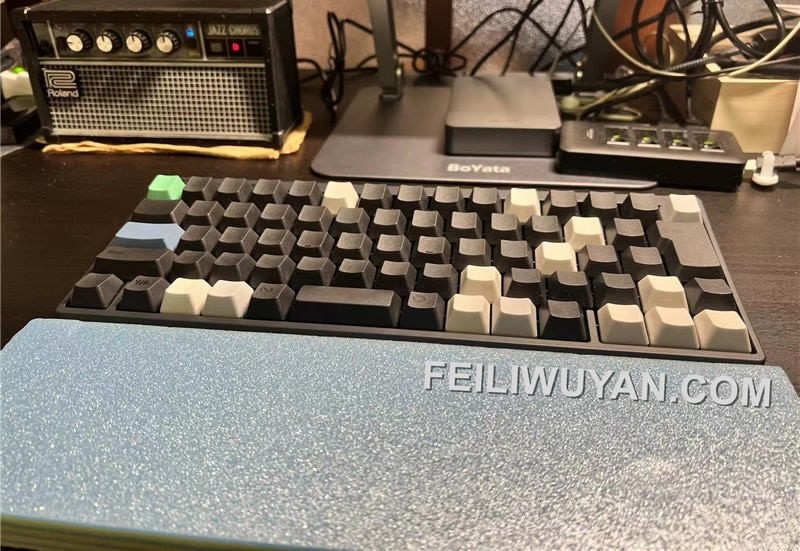
The English-layout HHKB comes in a blank (no-legend) keycap version; the Japanese layout does not. To achieve blank keycaps on my Japanese-layout HHKB, I bought two sets of English blank keycaps. That let me replace all keycap legends except the Enter and Shift keys, which have different sizes between English and Japanese layouts.
That workaround is no longer necessary — blank keycaps for the Japanese layout have now become available this month. They’re slightly more expensive than English-layout blanks, but still cheaper than buying two sets like I did.
Some people say blank keycaps are risky for “flexing” — fumbling around for punctuation keys is embarrassing. In the interest of responsible flexing, I bought one black set and one white set, using the white keycaps as visual anchors for quick position finding. There are still occasional moments of uncertainty with certain symbol keys — especially since key positions between the Japanese IME and English input modes don’t always match, so sometimes you just have to try.
Realforce recently released official blank keycaps as well, available in many colors. Hopefully there will be more Topre-compatible keycap options in the future, particularly for Japanese layouts (the English layout already has a decent third-party keycap market).
Connectivity & Battery
Both keyboards are dual-mode — wired USB or Bluetooth. Wired doesn’t require batteries, but for convenience I prefer Bluetooth. Both run on 2 AA batteries (単3形 in Japanese sizing). Many people prefer lithium rechargeable these days; to each their own. Since picking them up in February, the Realforce is still above 50% charge, and the HHKB is still at 100% (I may use the HHKB slightly less, or the smaller form factor might be more power-efficient). At this usage rate, battery changes are essentially a non-issue.
Stability is good on both fronts. The Realforce has occasionally dropped its Bluetooth connection — possibly because the office has too many peripherals competing for wireless bandwidth. There was also one instance where a key registered as held down continuously after a single press. Bluetooth response latency feels on par with wired for non-gaming use. Switching between connected devices is essentially instant.
The shared downside is just price — and HHKB prices have recently gone up, not just the keyboards themselves but also keycaps, wrist rests, and other accessories.
Summary
For anyone who does a lot of typing on a daily basis, I strongly recommend both of these electrostatic capacitive keyboard brands.
Original article published on 非礼勿言 (Feiliwuyan). Copyright belongs to the original author.